SMS Notification Consent
IntraSafe sends SMS messages to keep security teams coordinated during incidents. This page documents our opt-in consent process for A2P 10DLC compliance. For details on how we handle your phone number and SMS data, see our Privacy Policy.
Where consent is captured
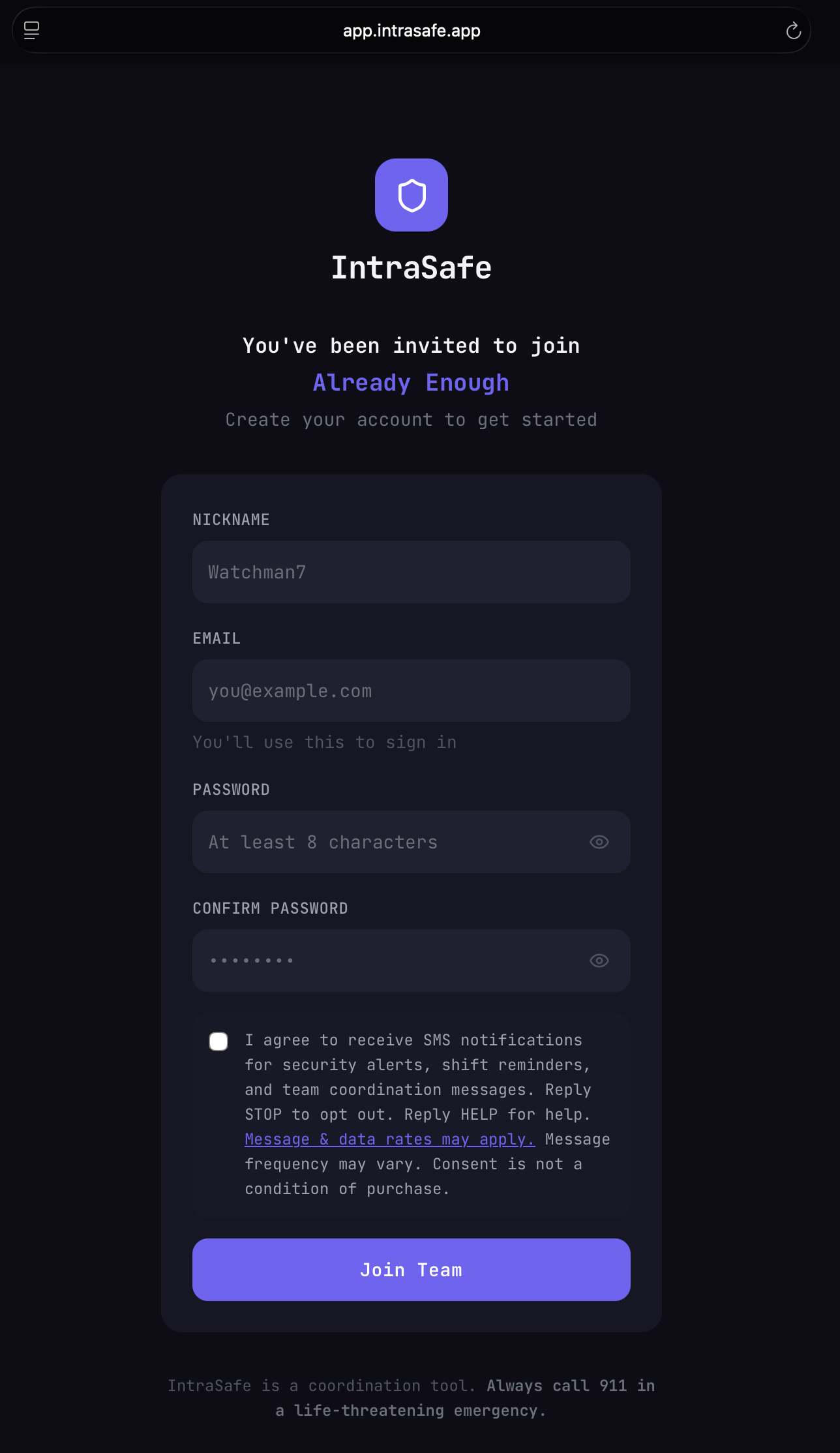
Consent checkbox — account creation form (Join with Token)
How users opt in
- An organization administrator invites a user via a unique invite link.
- The user opens https://app.intrasafe.app and creates an account using the invite link.
- During account creation, a dedicated SMS consent checkbox is displayed (unchecked by default, separate from Terms and Privacy acceptance).
- If the user checks the box and submits the form, their consent and timestamp are recorded in the database.
- Only users who checked the box receive SMS messages.
- Users who did not check the box can enable SMS later from their Profile settings in the app.
Automated message responses
OPT-IN CONFIRMATION
When a user opts in, they receive: "IntraSafe: You're opted in to receive security alerts, shift reminders, and team coordination messages. Reply HELP for help or email support@intrasafe.app. Message frequency may vary. Msg&data rates may apply. Reply STOP to opt out."
HELP RESPONSE
When a user replies HELP, they receive: "IntraSafe: Security volunteer coordination platform. For support, email support@intrasafe.app or visit https://intrasafe.app. Reply HELP for help. Reply STOP to opt out."
OPT-OUT CONFIRMATION
When a user replies STOP, they receive: "IntraSafe: You are unsubscribed and will receive no further messages."
Program details
- Brand name IntraSafe
- Message types Security alerts Shift reminders Team coordination Incident response
- Message frequency Varies — typically 0–5 messages per day depending on active incidents and scheduled shifts
- Audience Security volunteers and staff who have been explicitly invited to an organization by an admin. No cold outreach.
- Opt-in method Voluntary checkbox at account creation (unchecked by default, not required to create an account)
- Opt-out Reply STOP to any message. Users can also disable SMS in their profile settings.
- Help Reply HELP or email support@intrasafe.app
- Carrier disclaimer Message & data rates may apply
Sample messages
SECURITY ALERT
[IntraSafe] 🚨 ALERT: Suspicious activity reported at Gate B — Westfield Org. Open the app to respond. Reply STOP to opt out, HELP for help.
SHIFT REMINDER
[IntraSafe] Reminder: Your shift starts in 30 min (Zone A, 2:00 PM). Reply STOP to opt out, HELP for help.
TEAM COORDINATION
[IntraSafe] Admin has updated your assignment for tonight's event. Check the app for details. Reply STOP to opt out, HELP for help.
CRITICAL DELIVERY FALLBACK
[IntraSafe] Backup notification: A critical safety alert was issued for your organization and push delivery may be unavailable. Open the app now for details. Reply STOP to opt out, HELP for help.